Best Image Recognition Software

How Many Image Recognition Software Products Does G2 Track?

Total Products under this Category: 664

Category Stats (Sep 2026)

  • Average Rating: 4.42/5 (↓0.03 vs Aug 2026) The average rating of products in this category, based on all submitted ratings
  • Top Trending Product: Deepdream (+5.29%) - Among all products in this category, Deepdream recorded the largest rating increase compared to last month

Last updated: September 01, 2026

How Does G2 Rank Image Recognition Software Products?

Why You Can Trust G2's Software Rankings:

  • 30 Analysts and Data Experts
  • 1,900+ Authentic Reviews
  • 664+ Products
  • Unbiased Rankings

G2's software rankings are built on verified user reviews, rigorous moderation, and a consistent research methodology maintained by a team of analysts and data experts. Each product is measured using the same transparent criteria, with no paid placement or vendor influence. While reviews reflect real user experiences, which can be subjective, they offer valuable insight into how software performs in the hands of professionals. Together, these inputs power the G2 Score, a standardized way to compare tools within every category.

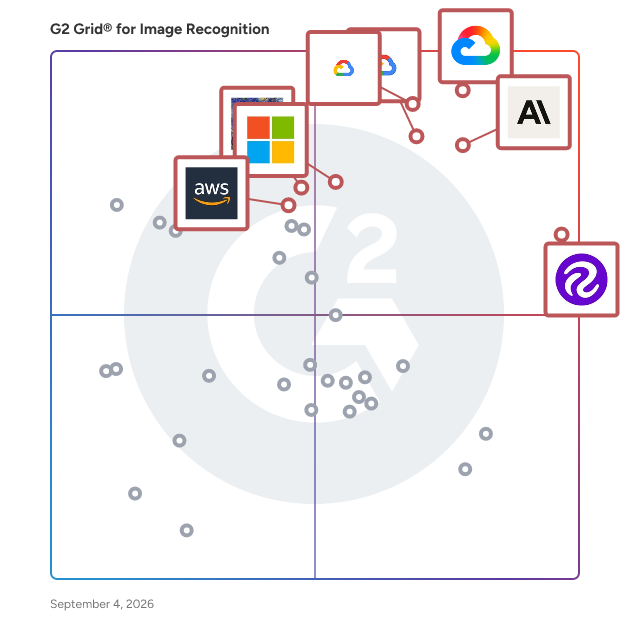
G2 Grid® for Image Recognition Software

G2 Grid® for Image Recognition Software plotting products by satisfaction and market presence

Highlighted products: Google Cloud Vision API, Roboflow, Claude, Video AI, Google Cloud AutoML Vision, Microsoft Computer Vision API, Deepdream, and Amazon Rekognition.

Underlying data: [Grid® JSON](https://www.g2.com/categories/image-recognition/grids.json?focus%5B%5D=google-cloud-vision-api&focus%5B%5D=roboflow&focus%5B%5D=claude-2025-12-11&focus%5B%5D=video-ai&focus%5B%5D=google-cloud-automl-vision&focus%5B%5D=microsoft-computer-vision-api&focus%5B%5D=deepdream&focus%5B%5D=amazon-rekognition)

Google Cloud Vision API

Detect and classify multiple objects, images, and more using Google Cloud's pre-trained Vision API or custom trained Vision AutoML. Google Cloud's Vision AI helps developers easily leverage the power of machine learning to understand images with industry-leading prediction accuracy.

Average Rating: 4.4/5.0

Total Reviews: 113

How Do G2 Users Rate Google Cloud Vision API?

  • Object Detection: 9.3/10 (Category avg: 8.8/10)
  • Ease of Use: 9.0/10 (Category avg: 8.8/10)
  • Custom Image Detection: 9.0/10 (Category avg: 8.5/10)
  • Bounding Boxes: 8.9/10 (Category avg: 8.3/10)

Who Is the Company Behind Google Cloud Vision API?

  • Seller: Google
  • Year Founded: 1998
  • HQ Location: Mountain View, CA
  • Twitter: @google
    31,899,995 Twitter followers
  • LinkedIn® Page: www.linkedin.com
    341,888 employees on LinkedIn®
  • Ownership: NASDAQ:GOOG

Who Uses This Product?

  • Who Uses This: Software Engineer
  • Top Industries: Information Technology and Services, Computer Software
  • Company Size: 54% Small, 27% Large

What Are Recent G2 Reviews of Google Cloud Vision API?

Roboflow

Roboflow has everything you need to build and deploy computer vision applications. Over 1,000,000 users from businesses of every size — from startups to public companies — use the company's end-to-end platform for image and video collection, organization, annotation, preprocessing, model training, and deployment. Roboflow provides tools for each step in the computer vision deployment lifecycle and integrates with your existing solutions so you can tailor your pipeline to meet your needs.

Average Rating: 4.7/5.0

Total Reviews: 160

How Do G2 Users Rate Roboflow?

  • Object Detection: 9.3/10 (Category avg: 8.8/10)
  • Ease of Use: 9.3/10 (Category avg: 8.8/10)
  • Custom Image Detection: 9.5/10 (Category avg: 8.5/10)
  • Bounding Boxes: 9.4/10 (Category avg: 8.3/10)

Who Is the Company Behind Roboflow?

  • Seller: Roboflow
  • Year Founded: 2019
  • HQ Location: Remote, US
  • Twitter: @roboflow
    13,577 Twitter followers
  • LinkedIn® Page: www.linkedin.com
    144 employees on LinkedIn®

Who Uses This Product?

  • Who Uses This: Founder, Researcher
  • Top Industries: Computer Software, Research
  • Company Size: 78% Small, 14% Medium

What Do G2 Reviewers Say About Roboflow?

AI-generated summary from verified user reviews

Pros
  • Users appreciate the ease of use of Roboflow, enabling efficient model training and collaboration with a user-friendly interface.
  • Users highlight Roboflow's efficiency in dataset management, streamlining tasks and significantly saving time and reducing errors.
  • Users value the annotation efficiency of Roboflow, enjoying time savings and reduced errors in dataset management.
  • Users love how Roboflow's data labeling simplifies collaboration, annotation, and export processes, saving time and reducing errors.
  • Users appreciate the powerful and versatile features of Roboflow, making it ideal for academic and large-scale projects.
Cons
  • Users find the cost prohibitive for advanced features, especially students needing budget-friendly options.
  • Users note the limited features of Roboflow, as some advanced options require higher-tier plans and constraints exist.
  • Users experience limited functionality in Roboflow, particularly with advanced features and flexibility for complex tasks.
  • Users find annotation issues with Roboflow, especially in auto-labeling and polygon marking for complex images.
  • Users find inefficient labeling processes cumbersome, especially in team environments with a lack of automation and shortcuts.

What Are Recent G2 Reviews of Roboflow?

Claude

Claude is a state-of-the-art large language model (LLM) developed by Anthropic, designed to serve as a helpful, honest, and harmless AI assistant. With its advanced reasoning capabilities and conversational tone, Claude excels in tasks ranging from complex coding to in-depth financial analysis, making it a versatile tool for developers, enterprises, and financial professionals. Key Features and Functionality: - Advanced Coding Capabilities: Claude Opus 4 leads in coding performance, achieving top scores on benchmarks like SWE-bench and Terminal-bench. It supports sustained, long-running tasks, enabling continuous work for several hours, which is ideal for complex software development projects. - Financial Analysis Tools: Claude integrates seamlessly with financial data platforms such as Databricks and Snowflake, providing a unified interface for market analysis, research, and investment decision-making. It offers direct hyperlinks to source materials for instant verification, enhancing the efficiency of financial workflows. - Extended Context Windows: With an enhanced 500k context window available in Claude Sonnet 4, users can upload extensive documents, including hundreds of sales transcripts or large codebases, facilitating comprehensive analysis and collaboration. - Tool Use and Integration: Claude's extended thinking capabilities allow it to utilize tools like web search during reasoning processes, improving response accuracy. It also supports background tasks via GitHub Actions and integrates natively with development environments like VS Code and JetBrains for seamless pair programming. - Enterprise-Grade Security: The Claude Enterprise plan offers advanced security features, including Single Sign-On (SSO), Just-in-Time Provisioning (JIT), role-based permissions, audit logs, and custom data retention controls, ensuring data safety and compliance for organizations. Primary Value and User Solutions: Claude addresses the need for a reliable and intelligent AI assistant capable of handling complex tasks across various domains. For developers, it enhances productivity through advanced coding support and integration with development tools. Financial professionals benefit from its ability to unify and analyze diverse data sources, streamlining research and decision-making processes. Enterprises gain from its scalable solutions and robust security features, enabling efficient and secure deployment of AI capabilities within their operations. Overall, Claude empowers users to achieve higher efficiency, accuracy, and innovation in their respective fields.

Average Rating: 4.6/5.0

Total Reviews: 449

How Do G2 Users Rate Claude?

  • Object Detection: 8.7/10 (Category avg: 8.8/10)
  • Ease of Use: 9.2/10 (Category avg: 8.8/10)
  • Custom Image Detection: 7.9/10 (Category avg: 8.5/10)
  • Bounding Boxes: 7.7/10 (Category avg: 8.3/10)

Who Is the Company Behind Claude?

  • Seller: Anthropic
  • HQ Location: San Francisco, California
  • Twitter: @AnthropicAI
    1,440,248 Twitter followers
  • LinkedIn® Page: www.linkedin.com
    5,178 employees on LinkedIn®

Who Uses This Product?

  • Who Uses This: Software Engineer, Data Analyst
  • Top Industries: Computer Software, Information Technology and Services
  • Company Size: 53% Small, 33% Medium

What Do G2 Reviewers Say About Claude?

AI-generated summary from verified user reviews

Pros
  • Users value Claude's ease of use, allowing for clear, structured, and organized content creation effortlessly.
  • Users value Claude for its deep discussion capabilities and effective context management for intellectual pursuits.
  • Users find Claude to be exceptionally helpful for deep discussions, aiding in intellectual work and creative projects.
  • Users commend the accuracy of Claude, noting its well-articulated and thoroughly researched answers.
  • Users value Claude's clarity and structured communication, which greatly enhances health education and patient interactions.
Cons
  • Users face usage limitations with Claude, including access restrictions, performance inconsistency, and file handling issues.
  • Users note significant limitations with Claude, including focus on text, lack of visual support, and slow responsiveness.
  • Users find Claude's limited functionality restricts visual content creation and rapid research, impacting efficiency and usability.
  • Users find that Claude can be overly cautious and long-winded, hindering quick and effective responses.
  • Users find the resource limitations frustrating, impacting productivity and increasing costs for their workload management.

What Are Recent G2 Reviews of Claude?

Video AI

Video AI enables powerful content discovery and engaging video experiences.

Average Rating: 4.4/5.0

Total Reviews: 42

How Do G2 Users Rate Video AI?

  • Object Detection: 9.3/10 (Category avg: 8.8/10)
  • Ease of Use: 9.0/10 (Category avg: 8.8/10)
  • Custom Image Detection: 8.6/10 (Category avg: 8.5/10)
  • Bounding Boxes: 9.0/10 (Category avg: 8.3/10)

Who Is the Company Behind Video AI?

  • Seller: Google
  • Year Founded: 1998
  • HQ Location: Mountain View, CA
  • Twitter: @google
    31,899,995 Twitter followers
  • LinkedIn® Page: www.linkedin.com
    341,888 employees on LinkedIn®
  • Ownership: NASDAQ:GOOG

Who Uses This Product?

  • Top Industries: Computer Software, Marketing and Advertising
  • Company Size: 65% Small, 26% Medium

What Do G2 Reviewers Say About Video AI?

AI-generated summary from verified user reviews

Pros
  • Users find the accuracy of Video AI impressive, enhancing their video editing experience significantly.
  • Users value the AI-powered editing features of Video AI, enhancing speed and efficiency in content production.
  • Users value the ease of use of Video AI, enjoying its user-friendly interface for effortless editing.
  • Users value the AI-powered editing features of Video AI, which significantly enhance content production efficiency.
  • Users value the speed of AI-powered editing, making content production quicker and more efficient.
Cons
  • Users find the limited functionality of Video AI restricts experience, necessitating purchases for full effect access.
  • Users find the costly credits necessary for a good experience with Video AI to be a drawback.
  • Users feel the limited customization in Video AI restricts flexibility, especially for complex projects needing manual adjustments.

What Are Recent G2 Reviews of Video AI?

FAQs About Image Recognition Software

Generated using AI

Last updated: June 3, 2026

Image Recognition solutions trusted by Technology / AI organizations for critical workflows

According to verified users, trusted image recognition solutions for critical workflows are valued for reducing manual data preparation, speeding model iteration, and keeping annotation, dataset versioning, augmentation, training, and deployment steps in one place. Recent reviewers repeatedly highlight ease of use, fast setup, collaboration for labeling teams, and export flexibility into common development environments. Buyers in technology and AI settings also mention the importance of dependable support, reliable handling of large image sets, and workflows that help teams move from raw images to usable models without stitching together multiple tools. The strongest trust signals in these reviews come from repeatable data preparation, cleaner experimentation, and faster movement into production or research use cases.

Which Image Recognition solutions minimize implementation risks and support smooth adoption that support critical workflow requirements

Based on G2 reviews, these image recognition products are most often described as easier to adopt and operationalize.

  • Roboflow — annotation, versioning, training, and export.
  • Kwikpic — face recognition for photo delivery.
  • Claude — image analysis for mixed workflows.
  • Clarifai — quick testing with prebuilt vision models.

Image Recognition solutions with straightforward integration into existing tech stacks that support critical workflow requirements

According to verified users, straightforward integration in image recognition software usually means less custom plumbing between annotation, model training, export, and deployment. Recent reviewers describe value in tools that connect cleanly to notebooks, cloud environments, edge devices, browsers, or photo delivery workflows without forcing teams to rebuild pipelines from scratch. They also mention exports to common formats, API access, and compatibility with existing model frameworks as practical signs of easier integration. For buyers, the clearest pattern is that integration success is tied to how quickly a product fits into current data flows and operational processes while still supporting iteration, collaboration, and production handoff across technical teams.

What are the most important features in image recognition software

G2 reviewers mention that the most important features in image recognition software center on data preparation, automation, and deployment readiness. Across recent reviews, recurring priorities include image annotation and labeling tools, dataset versioning, preprocessing and augmentation, export into multiple formats, auto-labeling assistance, collaboration for teams, and model training or inference support. Buyers also care about usability, especially for beginners or mixed technical teams, because faster onboarding shortens time to value. Other commonly mentioned needs include handling large datasets, integration with notebooks or existing environments, and support for quality control during labeling. In practice, reviewers favor products that reduce manual workflow steps while keeping experimentation, iteration, and deployment manageable.

How do teams use Image Recognition for annotation and dataset versioning

According to verified users, teams use image recognition workflows for annotation and dataset versioning to make visual data preparation more consistent, collaborative, and repeatable. Recent reviews describe teams labeling images together, organizing projects into dataset versions, applying preprocessing and augmentation steps, and then exporting the resulting data into the training format they need. This helps reduce manual rework when experiments change or when multiple contributors are involved. Reviewers also note that versioning is especially useful for comparing training runs, maintaining clean splits, and tracking how data changes affect outcomes. For buyers, this workflow matters because it turns image preparation from a fragmented process into a more manageable system for iteration and quality control.

Google Cloud AutoML Vision

Derive insights from your images in the cloud or at the edge with AutoML Vision or use pre-trained Vision API models to detect emotion, understand text, and more.

Average Rating: 4.4/5.0

Total Reviews: 26

How Do G2 Users Rate Google Cloud AutoML Vision?

  • Object Detection: 9.1/10 (Category avg: 8.8/10)
  • Ease of Use: 8.7/10 (Category avg: 8.8/10)
  • Custom Image Detection: 8.8/10 (Category avg: 8.5/10)
  • Bounding Boxes: 9.0/10 (Category avg: 8.3/10)

Who Is the Company Behind Google Cloud AutoML Vision?

  • Seller: Google
  • Year Founded: 1998
  • HQ Location: Mountain View, CA
  • Twitter: @google
    31,899,995 Twitter followers
  • LinkedIn® Page: www.linkedin.com
    341,888 employees on LinkedIn®
  • Ownership: NASDAQ:GOOG

Who Uses This Product?

  • Top Industries: Computer Software
  • Company Size: 59% Small, 30% Large

What Are Recent G2 Reviews of Google Cloud AutoML Vision?

What Are G2 Users Discussing About Google Cloud AutoML Vision?

Microsoft Computer Vision API

The Microsoft Computer Vision API is a cloud-based service that provides advanced algorithms to process and analyze visual data from images and videos. It enables developers to extract rich information, facilitating the development of applications that can interpret and understand visual content. Key Features and Functionality: - Image Analysis: Detects and classifies objects, scenes, and activities within images, offering detailed content understanding. - Optical Character Recognition (OCR): Accurately extracts printed and handwritten text from images and documents in multiple languages. - Intelligent Tagging and Captioning: Generates descriptive tags and captions to enhance content searchability and accessibility. - Facial Detection: Identifies faces, estimates age, gender, and emotions, enabling secure authentication workflows. - Spatial Analysis: Understands how people move through a physical space in near-real time. Primary Value and Solutions Provided: The Microsoft Computer Vision API automates the extraction of meaningful information from visual content, reducing the need for manual image review and data entry. It enhances customer experiences by enabling applications to adapt to visual inputs in real time. Additionally, it improves compliance and security through features like sensitive content detection and facial recognition for authentication. By integrating this API, businesses can streamline operations, develop intelligent applications, and gain deeper insights from their visual data.

Average Rating: 4.1/5.0

Total Reviews: 49

How Do G2 Users Rate Microsoft Computer Vision API?

  • Object Detection: 10.0/10 (Category avg: 8.8/10)
  • Ease of Use: 8.2/10 (Category avg: 8.8/10)
  • Custom Image Detection: 5.0/10 (Category avg: 8.5/10)

Who Is the Company Behind Microsoft Computer Vision API?

  • Seller: Microsoft
  • Year Founded: 1975
  • HQ Location: Redmond, Washington
  • Twitter: @microsoft
    13,091,739 Twitter followers
  • LinkedIn® Page: www.linkedin.com
    231,632 employees on LinkedIn®
  • Ownership: MSFT

Who Uses This Product?

  • Top Industries: Hospital & Health Care
  • Company Size: 47% Small, 31% Medium

What Do G2 Reviewers Say About Microsoft Computer Vision API?

AI-generated summary from verified user reviews

Pros
  • Users value the effective communication of the Microsoft Computer Vision API, enhancing integration and development efficiency.
  • Users appreciate the breadth and accuracy of the Microsoft Computer Vision API's image analysis capabilities, enhancing development efficiency.
  • Users value the breadth and accuracy of Microsoft Computer Vision API's image analysis capabilities for diverse applications.
  • Users value the easy integrations with Azure services, enhancing the development of comprehensive solutions with the API.
  • Users value the breadth and accuracy of image analysis capabilities provided by Microsoft Computer Vision API for seamless integration.
Cons
  • Users face accuracy issues with complex images, leading to inconsistent results and additional processing requirements.
  • Users find the pricing at scale to be a significant drawback, especially with high-volume image processing.
  • Users frequently face integration issues while using the Microsoft Computer Vision API, leading to call failures.
  • Users find limited customization challenging for advanced use cases, affecting their ability to tailor the API effectively.

What Are Recent G2 Reviews of Microsoft Computer Vision API?

What Are G2 Users Discussing About Microsoft Computer Vision API?

Deepdream

And this is where Google's deep dream ideas originate. With simple words you give to an AI program a couple of images and let it know what those images contain ( what objects - dogs, cats, mountains, bicycles, ... ) and give it a random image and ask it what objects it can find in this image.

Average Rating: 4.1/5.0

Total Reviews: 24

How Do G2 Users Rate Deepdream?

  • Object Detection: 8.3/10 (Category avg: 8.8/10)
  • Ease of Use: 8.1/10 (Category avg: 8.8/10)
  • Custom Image Detection: 8.7/10 (Category avg: 8.5/10)
  • Bounding Boxes: 6.7/10 (Category avg: 8.3/10)

Who Is the Company Behind Deepdream?

  • Seller: Google
  • Year Founded: 1998
  • HQ Location: Mountain View, CA
  • Twitter: @google
    31,899,995 Twitter followers
  • LinkedIn® Page: www.linkedin.com
    341,888 employees on LinkedIn®
  • Ownership: NASDAQ:GOOG

Who Uses This Product?

  • Company Size: 67% Small, 17% Large

What Are Recent G2 Reviews of Deepdream?

What Are G2 Users Discussing About Deepdream?

Amazon Rekognition

Amazon Rekognition makes it easy to add image and video analysis to your applications. It can identify the objects, people, text, scenes, and activities, or any inappropriate content from an image or video.

Average Rating: 4.3/5.0

Total Reviews: 28

How Do G2 Users Rate Amazon Rekognition?

  • Object Detection: 7.9/10 (Category avg: 8.8/10)
  • Ease of Use: 8.4/10 (Category avg: 8.8/10)
  • Custom Image Detection: 6.7/10 (Category avg: 8.5/10)
  • Bounding Boxes: 7.1/10 (Category avg: 8.3/10)

Who Is the Company Behind Amazon Rekognition?

  • Seller: Amazon Web Services (AWS)
  • Year Founded: 2006
  • HQ Location: Seattle, WA
  • Twitter: @awscloud
    2,232,483 Twitter followers
  • LinkedIn® Page: www.linkedin.com
    147,094 employees on LinkedIn®
  • Ownership: NASDAQ: AMZN

Who Uses This Product?

  • Top Industries: Information Technology and Services
  • Company Size: 39% Small, 32% Large

What Are Recent G2 Reviews of Amazon Rekognition?

Azure Custom Vision Service

Azure Custom Vision Service is a tool for building custom image classifiers, and for making them better over time. This service enables you to identify your own objects and things in images.

Average Rating: 4.3/5.0

Total Reviews: 12

How Do G2 Users Rate Azure Custom Vision Service?

  • Ease of Use: 8.8/10 (Category avg: 8.8/10)

Who Is the Company Behind Azure Custom Vision Service?

  • Seller: Microsoft
  • Year Founded: 1975
  • HQ Location: Redmond, Washington
  • Twitter: @microsoft
    13,091,739 Twitter followers
  • LinkedIn® Page: www.linkedin.com
    231,632 employees on LinkedIn®
  • Ownership: MSFT

Who Uses This Product?

  • Company Size: 50% Medium, 33% Small

What Are Recent G2 Reviews of Azure Custom Vision Service?

Azure AI Content Safety

Build AI applications responsibly with Azure AI Content Safety Azure AI Content Safety is a safety system for monitoring content generated by both foundation models and humans. Detect and block potential risks, threats, and quality problems

Average Rating: 4.6/5.0

Total Reviews: 11

How Do G2 Users Rate Azure AI Content Safety?

  • Object Detection: 8.9/10 (Category avg: 8.8/10)
  • Ease of Use: 9.8/10 (Category avg: 8.8/10)
  • Custom Image Detection: 8.3/10 (Category avg: 8.5/10)
  • Bounding Boxes: 8.9/10 (Category avg: 8.3/10)

Who Is the Company Behind Azure AI Content Safety?

  • Seller: Microsoft
  • Year Founded: 1975
  • HQ Location: Redmond, Washington
  • Twitter: @microsoft
    13,091,739 Twitter followers
  • LinkedIn® Page: www.linkedin.com
    231,632 employees on LinkedIn®
  • Ownership: MSFT

Who Uses This Product?

  • Company Size: 45% Large, 45% Small

What Are Recent G2 Reviews of Azure AI Content Safety?

What Are G2 Users Discussing About Azure AI Content Safety?

NoahFace

NoahFace provides highly configurable software solutions that transform iPads and smartphones into the most flexible, scalable, and dependable clocking platform on earth. Fast, reliable, and accurate, NoahFace offers modern features like facial recognition, temperature & alcohol screening, and much more. These smart time clocks include a host of features, including: This smart time clock is packed with features, including: Touchless and minimal touch configurations Consent & attestation questions Mandatory breaks Job & task tracking Group punching Integrated mobile app (iOS & Android) Employee sentiment analysis Dynamic cost center selection Integrations with other hardware, including access control, temperature screening, alcohol screening and more

Average Rating: 4.8/5.0

Total Reviews: 23

How Do G2 Users Rate NoahFace?

  • Object Detection: 9.6/10 (Category avg: 8.8/10)
  • Ease of Use: 9.6/10 (Category avg: 8.8/10)
  • Custom Image Detection: 9.2/10 (Category avg: 8.5/10)
  • Bounding Boxes: 9.2/10 (Category avg: 8.3/10)

Who Is the Company Behind NoahFace?

  • Seller: noahface
  • Year Founded: 2016
  • HQ Location: Sydney, New South Wales
  • LinkedIn® Page: www.linkedin.com
    17 employees on LinkedIn®

Who Uses This Product?

  • Company Size: 50% Medium, 46% Small

What Are Recent G2 Reviews of NoahFace?

scikit-image

scikit-image is a collection of algorithms for image processing.

Average Rating: 4.4/5.0

Total Reviews: 13

How Do G2 Users Rate scikit-image?

  • Object Detection: 8.3/10 (Category avg: 8.8/10)
  • Ease of Use: 8.8/10 (Category avg: 8.8/10)
  • Bounding Boxes: 8.3/10 (Category avg: 8.3/10)

Who Is the Company Behind scikit-image?

Who Uses This Product?

  • Company Size: 38% Large, 31% Small

What Are Recent G2 Reviews of scikit-image?

Kwikpic

Kwikpic is an AI-powered photo management platform for photographers, event organizers, and businesses. It automates photo sorting, delivery, and client management, simplifying workflows. With advanced facial recognition (up to 99.9% accuracy), Kwikpic instantly delivers event photos directly to attendees via personalized galleries. Use cases include professional event photography, weddings, conferences, corporate gatherings, and festivals requiring quick and accurate photo delivery. Key Features: AI Facial Recognition for quick and accurate photo sorting Customizable digital galleries for easy access Branding tools for professional presentation Client collaboration and approval tools Integrated online sales for direct photo purchases Benefits: Reduces manual effort Provides instant photo access Scalable for events of any size Enhances brand consistency Kwikpic simplifies photo sharing and client interactions.

Average Rating: 4.9/5.0

Total Reviews: 24

How Do G2 Users Rate Kwikpic?

  • Object Detection: 7.1/10 (Category avg: 8.8/10)
  • Ease of Use: 9.5/10 (Category avg: 8.8/10)
  • Custom Image Detection: 7.7/10 (Category avg: 8.5/10)
  • Bounding Boxes: 2.8/10 (Category avg: 8.3/10)

Who Is the Company Behind Kwikpic?

  • Seller: Kwikpic
  • Year Founded: 2019
  • HQ Location: Mumbai, IN
  • LinkedIn® Page: www.linkedin.com
    15 employees on LinkedIn®

Who Uses This Product?

  • Who Uses This: Owner
  • Top Industries: Photography
  • Company Size: 96% Small

What Do G2 Reviewers Say About Kwikpic?

AI-generated summary from verified user reviews

Pros
  • Users admire the ease of use of Kwikpic, highlighting its intuitive design and swift setup process.
  • Users praise Kwikpic for its high accuracy in facial recognition, ensuring quick and reliable results for clients.
  • Users commend the accurate facial recognition of Kwikpic, enhancing client satisfaction with speedy and reliable results.
  • Users appreciate the efficient and innovative features of Kwikpic, simplifying photo sharing and boosting their photography business.
  • Users love the seamless photo sharing experience of Kwikpic, appreciating its simplicity and professional quality.
Cons
  • Users are frustrated by the limited functionality of Kwikpic, including basic QR designs and restrictions on device usage.
  • Users report occasional access issues, including login problems and limited device usage restrictions that hinder experience.
  • Users express concerns about limited storage capacity on Kwikpic, wishing for increased options and affordability.
  • Users struggle with the inability to delete groups without first removing all participants, complicating management efforts.
  • Users report occasional accuracy issues with sign-up and photo visibility, possibly due to client errors or reluctance.

What Are Recent G2 Reviews of Kwikpic?

Gesture Recognition Toolkit

Gesture Recognition Toolkit (GRT) is a cross-platform, open-source, C++ machine learning library designed for real-time gesture recognition.

Average Rating: 4.7/5.0

Total Reviews: 10

How Do G2 Users Rate Gesture Recognition Toolkit?

  • Object Detection: 8.6/10 (Category avg: 8.8/10)
  • Ease of Use: 9.4/10 (Category avg: 8.8/10)
  • Custom Image Detection: 9.4/10 (Category avg: 8.5/10)
  • Bounding Boxes: 8.3/10 (Category avg: 8.3/10)

Who Is the Company Behind Gesture Recognition Toolkit?

Who Uses This Product?

  • Company Size: 60% Small, 20% Medium

What Are Recent G2 Reviews of Gesture Recognition Toolkit?

What Are G2 Users Discussing About Gesture Recognition Toolkit?

Clarifai

Clarifai is a leader in AI orchestration and development, helping organizations, teams, and developers build, deploy, orchestrate, and operationalize AI at scale. Clarifai’s cutting-edge AI workflow orchestration platform leverages today's modern AI technologies like Large Language Models (LLMs), Large Vision Models (LVMs), and Retrieval Augmented Generation (RAG), data labeling, inference, and more, and is available in cloud, on-premises, or hybrid environments. Founded in 2013, Clarifai has been used to build more than 1.5 million AI models with more than 400,000 users in 170 countries. Learn more at www.clarifai.com.

Average Rating: 4.3/5.0

Total Reviews: 73

How Do G2 Users Rate Clarifai?

  • Object Detection: 9.1/10 (Category avg: 8.8/10)
  • Ease of Use: 8.3/10 (Category avg: 8.8/10)
  • Custom Image Detection: 9.1/10 (Category avg: 8.5/10)
  • Bounding Boxes: 8.6/10 (Category avg: 8.3/10)

Who Is the Company Behind Clarifai?

  • Seller: Clarifai
  • Year Founded: 2013
  • HQ Location: Wilmington, Delaware
  • Twitter: @clarifai
    10,922 Twitter followers
  • LinkedIn® Page: www.linkedin.com
    49 employees on LinkedIn®

Who Uses This Product?

  • Top Industries: Computer Software, Information Technology and Services
  • Company Size: 61% Small, 28% Medium

What Do G2 Reviewers Say About Clarifai?

AI-generated summary from verified user reviews

Pros
  • Users appreciate Clarifai for its impressive models and flexibility, enhancing image and video recognition effectively.
  • Users value the easy AI tools of Clarifai, enabling fast and accurate image and video recognition effortlessly.
  • Users value the model variety in Clarifai, enabling tailored solutions with impressive flexibility and ease of integration.
  • Users appreciate the cutting-edge AI integration of Clarifai, enabling accurate image and video recognition through customizable models.
  • Users appreciate the cutting-edge AI capabilities of Clarifai, especially for image and video recognition tasks.
Cons
  • Users find the platform expensive for small-scale developers, as costs can accumulate quickly with usage.
  • Users find the complexity of setup and documentation challenging, especially for newcomers to the platform.
  • Users find the learning curve steep for Clarifai, particularly for those new to machine learning platforms.
  • Users face a lack of resources, hindering accessibility for small-scale developers and non-profits seeking affordable options.
  • Users often find the poor documentation of Clarifai lacking detail, hindering their ability to maximize its features.

What Are Recent G2 Reviews of Clarifai?

Bijou Barry
BB
Researched and written by Bijou Barry
Updated April 9, 2026

Learn More About Image Recognition Software

What is About Image Recognition Software?

Image recognition software, also known as computer vision software, gives users the ability to input images and receive data back in the form of a label. This process, done through machine learning (ML), enables end users to gain an understanding of images which they might not be able to do with their naked eye. Since videos are fundamentally composed of a series of images, image recognition software can also be used to analyze video feeds.

The possible uses for this technology are broad and varied. For example, health care professionals can use it to assess if a tumor is malignant or benign. In addition, automotive companies can use image recognition software to further the development of self-driving cars, as image recognition allows the car to “see" by providing labels for what the camera on the car captures. Another popular use case is image search, where users can take a picture of an object and receive search results as a result. Retailers can use this as an alternative to text search. Finally, facial recognition software utilizes image recognition: The algorithm takes a face as an input and produces information as an output.

Key Benefits of Image Recognition Software

  • Empower users to gain understanding of images through labeling
  • Give end users an opportunity to make meaning out of image data
  • Create smarter applications with computer vision capabilities

Why Use Image Recognition Software?

Business applications with image recognition functionality provide end users with the tools they need to succeed. For example, if a retail company wants to build a smarter search function or a medical institution seeks to supercharge their disease detecting abilities, image recognition algorithms or software can come to the rescue.

Engaged users — Incorporating image recognition into applications results in higher productivity for end users, since they can make meaning of the images within the application they use.

Better applications — Users spend more time using applications when they are enhanced with image recognition capabilities, leading to enhanced productivity and better deployment of the applications.

Cut costs — Building out a robust image recognition function can be a costly endeavor and could take a significant amount of time. While this software might require additional development work in the long run, it helps businesses save money and develop insights.

Who Uses Image Recognition Software?

Images are just pixels. As a result, with the advancement of AI techniques like deep learning, we are able to grasp the meaning behind these pixels through advanced computer vision techniques. Thanks to the aforementioned technology, image analysis and image-based insights are open to many. However, there are still specific positions that utilize this software more than others.

Software developers — Developers that want to create the next generation of products and services can use image recognition software to build computer vision capabilities into their applications, including object recognition, facial recognition, image search, and more .

Marketers — Image recognition solutions can provide insights into images for marketers looking to understand the impact and reach of their brand. For example, a marketing professional can use the technology to detect and track their logo across social media platforms.

Health care professionals — As the health care industry becomes more digital and image recognition techniques gain traction in the industry, it will be easier for doctors to quickly identify and diagnose maladies to support quick, accurate clinical decision-making.

Retailers— Image search is the new text search. As a result, smart retailers are building applications with search powered by image recognition to give end users a more powerful search experience.

Kinds of Image Recognition Software

By using image recognition software, users can better understand images—unlocking the meaning contained within them. As a result, they can make important business decisions, create better applications, and improve functionality of existing tools.

Image restoration — Uses machine learning to improve the quality of images through techniques such as improving focus and reducing blur.

Object recognition — Allows for the recognition of objects or object classes for either pre-specified or learned objects.

Scene reconstruction — Given images of a scene, or a video, scene reconstruction computes a 3D model of a scene.

Motion analysis — Processes video, or image sequences, to track objects or individuals.

Image Recognition Software Features

Image recognition software tends to have a wide range of features, including image labeling, text detection, and more. These features help end users understand their images better and unlock insights. The following features are found in many image recognition software offerings.

Image labeling — Image recognition software allows users to identify objects in an image and can help provide labels for these detected objects. More robust solutions allow users to create custom labels, letting them tailor the labels to their particular industry or use case. By training the machine learning model on data, the software can accurately detect objects based on these inputted labels.

Text detection — Many image recognition tools recognize text and can translate it into a machine readable format.

Facial recognition — Takes an image of a face and provides the identity of the individual as an output.

Inappropriate content detection — Allows images and videos to be moderated by identifying potentially inappropriate or unsafe content.

Other features of image recognition software include: APIs & SDKs, Machine Learning Libraries & Frameworks, On Device & Edge, Operations, Platform, Retail, and Security.

Potential Issues with Image Recognition Software

Plan for adoption — At the start, image recognition tools may not seem valuable to all employees—end users might struggle to adopt the solutions. Therefore, it’s important for companies to have a plan in place to encourage and promote user adoption.

Time to market — As with any software implementation, it’s important to think about how long it will take to implement. It’s important to consider related software that a company might need, such as data integration software.

Data security — Don’t make data security an afterthought. Companies must consider security options to ensure the correct users see the correct data. They must also have security options that allow administrators to assign verified users different levels of access to the platform.

Image manipulation — The rise of advanced computer vision algorithms has seen an increased risk of advanced image manipulation such as deepfakes. Using techniques such as Generative Adversarial Networks, bad actors can create lifelike videos and images, that are almost indistinguishable from the real thing.